
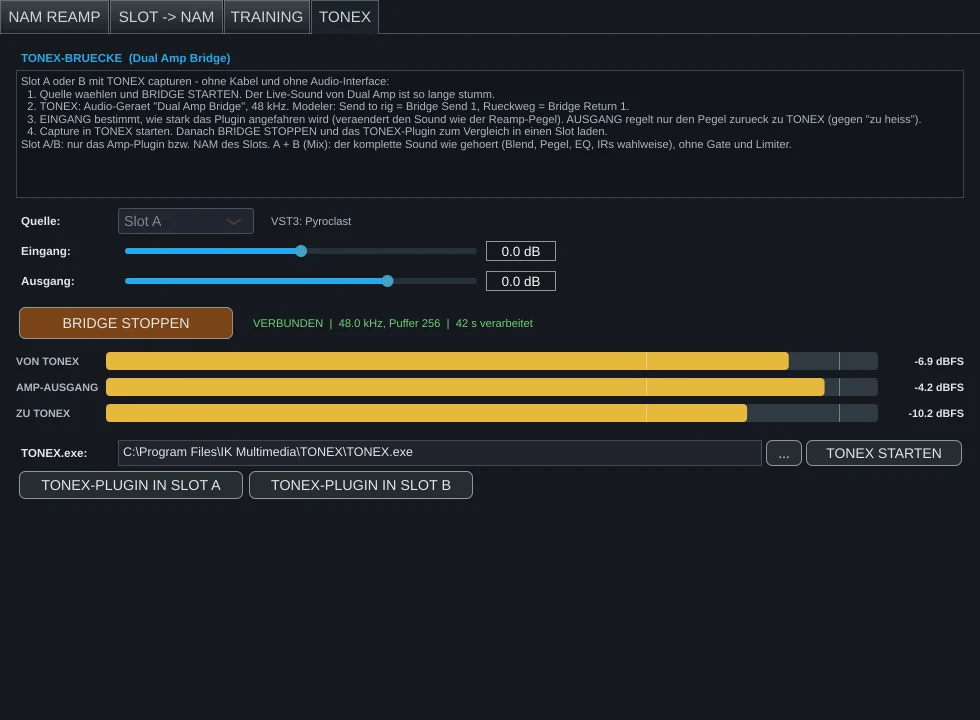
For a TONEX capture, the Modeler has to send its test signal into the amplifier and record the response. With hardware that takes a reamp box and cables, with plugins usually a virtual audio cable. Dual Amp Loader does it with a dedicated driver.
What is the Dual Amp Bridge?
The Dual Amp Bridge is a virtual ASIO driver installed with Dual Amp Loader. To TONEX it looks like an audio interface. In reality it leads straight into Dual Amp Loader: whatever TONEX sends to “Bridge Send 1” runs through your slot, and the result comes back on “Bridge Return 1” – sample-accurate, without a detour through the sound card.
Step by step
- In Dual Amp Loader, open CAPTURE → TONEX.
- Choose the source: Slot A, Slot B or A + B (mix). For the mix, optionally with impulse responses (“full rig”).
- Click BRIDGE STARTEN. Dual Amp’s live sound is muted from now on; the signal belongs to TONEX.
- Start TONEX (the TONEX STARTEN button usually finds it automatically) and choose Dual Amp Bridge at 48 kHz as the audio device.
- In the Modeler: send to rig = Bridge Send 1, return = Bridge Return 1.
- Set the levels (see below) and start the capture in TONEX.
- Afterwards click BRIDGE STOPPEN in Dual Amp. You can load the finished tone model with the TONEX plugin into a slot and compare it directly with the original.
The two level controls
- Eingang (input) sets how hard the plugin is driven. It changes the sound like the reamp level on a real amp: more level, more drive.
- Ausgang (output) only sets how loud the signal returns to TONEX. If it is “too hot” in TONEX, turn it down here – it doesn’t change the tone.
Frequently asked questions
TONEX shows no channels or hangs while selecting them
Briefly choose another audio device (e.g. Windows Audio), then Dual Amp Bridge again. Current versions support any buffer size, so this rarely happens any more.
Can I change the amp while the bridge is running?
Yes. The bridge pauses briefly (TONEX hears silence meanwhile) and then continues with the new plugin. Of course you shouldn’t change anything during a running capture.
Do I need the bridge if I don’t own TONEX?
No. It is a separate component in the installer and can be deselected. Once installed, it is only active when an audio program selects it.